
Summary
- ezyCollect has been part of Sidetrade since October 2025 and now sells as ezyCollect by Sidetrade. It doesn’t publish prices: a 14-day free trial is the only self-serve option, and listing sites show entry plans from $40 to $125 a month.
- ezyCollect’s reminder workflows send email and SMS reminders before and after the due date, turn overdue accounts into call tasks and put a Pay now button on invoices, statements and reminders.
- Four ezyCollect alternatives are compared here: Trove, Chaser, Upflow and Kolleno, on price, reminder workflows, reply handling, approvals and ERP coverage.
- Which one fits: Trove for finance teams that want customer replies turned into promised dates and approvals before chasers go, at a fixed monthly price. Chaser for UK teams that want a payment portal and credit control services. Upflow for SaaS teams that manage AR by the numbers. Kolleno for teams that want payments, reconciliation and collections in one platform.
- Trove is from £65 a month with unlimited users. Xero, QuickBooks, FreeAgent and Stripe are on every plan, and Business Central and NetSuite are on Advanced at £300 a month.
What ezyCollect costs in 2026
ezyCollect doesn’t list prices on its website. The only self-serve route is a 14-day free trial with no credit card, and every other path goes through a demo request.
Listing sites give a rough starting point, checked 20 Nov 2026:
- GetApp UK shows pricing starting from US$125 a month.
- SoftwareSuggest lists a $40 a month plan for Xero or MYOB users, for up to 10 debtors and one user.
Neither figure is likely to fit a finance team with hundreds of customers and several people chasing. Ask ezyCollect for a quote based on your debtor count, users and ERP.
ezyCollect’s reminder sequences and AR workflows compared
ezyCollect runs automated workflows that send email and SMS reminders on a schedule you set, including a pre-due reminder, then escalate overdue accounts to call tasks for your team. Its homepage shows different workflows per customer type: a light touch for good payers, earlier and firmer reminders for late payers, and a key account workflow where the invoice comes from a named account manager. When a customer picks a promise-to-pay date in the payment portal, reminders pause and pick up again if the date passes.
The table compares the same workflow details across ezyCollect and the four alternatives. Each fact links to the vendor page it comes from, checked 20 Nov 2026. “Not described” means the pages we read didn’t cover it, so it’s worth asking the vendor.
| Workflow detail | ezyCollect | Trove | Chaser | Upflow | Kolleno |
|---|---|---|---|---|---|
| Reminder channels | Email and SMS, with call tasks | Email, plus SMS and posted letters as a pay-as-you-go add-on | Email, SMS, automated calls and letters | Email, SMS, calls and letters | Email, with set numbers of SMS and calls included per plan |
| Reminder schedules | Customisable workflows with pre-due reminders and escalation steps | A workflow per customer type, each with its own schedule, templates and statement steps | Schedules before, on or after the due date, by customer segment | Workflows per segment, with rules that assign customers | Workflow automation from Business Plus up |
| Who the reminder comes from | Branded reminders, with an example key account workflow sent from a named account manager | Your own Gmail, Outlook or domain, and you can switch from a shared address to a named person later in the sequence | Not described | Your own domain, not a no-reply address | Not described |
| How replies are handled | Customers log a promise to pay in the portal and reminders pause. Its AI follow-up product is listed as coming soon | The AI Reply Agent reads replies, logs the promised date in your accounting software and drafts your response | Reminders can be paused on a disputed invoice. Reply handling not described | AI agents reply, log promise-to-pay dates and flag disputes | A collections inbox and AI-driven responses to client queries |
| Task workflows | Overdue accounts become call tasks with notes and history attached | Suggested actions from each reply on a task list, and a shared board with an owner on every account (Integrated) | Tasks you create, assign and track across the team | A shared AR inbox and @mentions for Finance, Sales and CS | A task workspace to delegate, add notes and escalate |
| Payment portal | Yes, Pay now buttons for bank transfer, direct debit, ACH or card | No | Yes, with payment links in reminders | Branded customer portals from Grow up | Yes, on every plan |
| Approvals before sending | Not described | Drafted replies wait for approval by default. Approvers for anyone with limited access on Advanced | Not described | Agents can ask before sending, with role-based permissions | Not described |
How Trove turns a customer reply into a promised date
Example Grocers Ltd supplies supermarkets and has about 100 staff. Priya runs credit control, and Tim is the account manager for its biggest retail customer. Here’s what happens when a customer replies to one of Trove’s reminders:
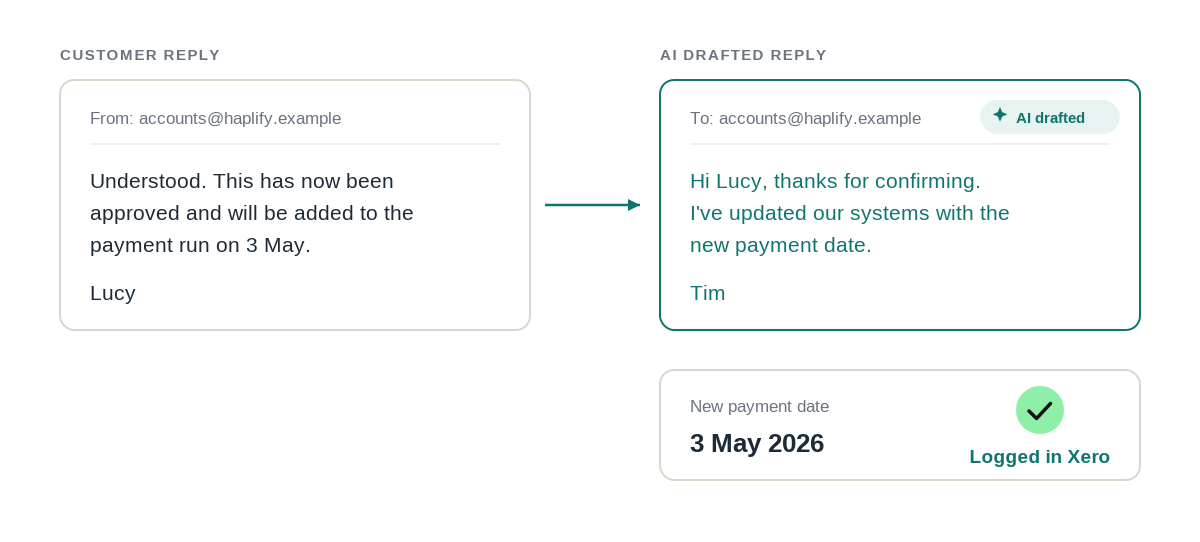
- The customer replies to the reminder. It was sent from Priya’s own Outlook address, so the reply lands in her inbox: “This has been approved and will go in the payment run on 3 May.”
- Trove reads the reply. The AI Reply Agent picks out 3 May as the promised date and suggests setting it as the expected payment date in the accounting software.
- Trove drafts the response. A short thank-you confirming 3 May waits on Priya’s task list next to the suggested date.
- Priya approves both. The date syncs back to the ledger, chasing pauses, and Trove schedules a follow-up in case the payment doesn’t arrive.
- The payment lands. If the invoice is paid before the follow-up is due, Trove cancels it.
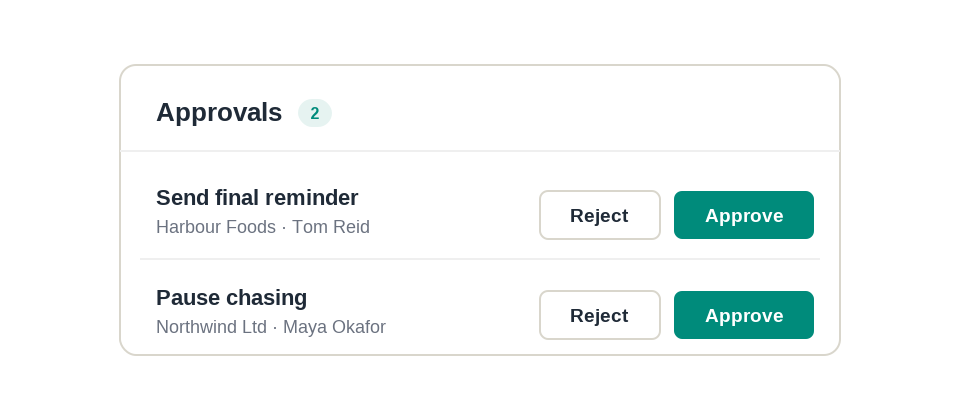
Once Priya has approved the same kind of action a few times, she can switch it to auto-approve. Tim’s retail account works differently: on Advanced, before the second reminder goes to that customer, Tim approves it. He knows what the buyer is about to receive and can sort out a query first, while Priya keeps running the ledger.
Why finance teams look for an alternative to ezyCollect
ezyCollect describes itself as an AR platform for small and medium businesses, and its trial page lists sales numbers for the US, Australia and New Zealand. For a UK finance team at a business of about 100 staff, these are the usual reasons to compare it with other tools:
- You need a price before a demo. With several people chasing and an ERP to connect, you’ll want the cost per user and per entity early. ezyCollect quotes after a conversation.
- Your ERP needs to match. ezyCollect lists Microsoft Dynamics 365, NetSuite, Xero, QuickBooks Online and others. If you run Business Central, check which Dynamics 365 product its integration covers.
- Several people chase the same ledger. Teams split by entity, region or account manager need an owner on each account and a clear record of who said what.
- Some customers need a person to approve the chaser. Key accounts, disputed invoices and customers with a sales relationship often need sign-off before a reminder goes out.
- You already take payments elsewhere. ezyCollect’s payment portal is one of its strongest features. If GoCardless, Stripe or bank transfer already work well for your customers, you may not need it.
The ezyCollect alternatives, one by one
1. Trove: best for finance teams that want replies and approvals handled
Pricing: £65 a month on Essential, £140 on Integrated and £300 on Advanced, with unlimited users and a 30-day free trial.
Trove chases from your own email address, reads every reply with the AI Reply Agent and logs promised dates back to your ledger. Integrated adds the shared team board, Slack and Teams alerts, and HubSpot, where every chaser and statement Trove sends is logged on the customer’s HubSpot record. Advanced adds Business Central and NetSuite, user roles and approvals and multiple entities. Trove is listed on Microsoft Marketplace, where every app is reviewed against Microsoft’s marketplace certification policies before it’s published.
Drawback: Trove has no customer payment portal or Pay now button, so customers keep paying the way they already do. If online card payments matter, ezyCollect, Chaser, Upflow and Kolleno all offer them.
2. Chaser: best for UK teams that want a payment portal and services
Pricing: from £199 a month on Compact (annual revenue under £4m, 4 users), £599 on Core (under £10m, unlimited users) and £899 on Complete (under £100m). Checked 20 Nov 2026.
Chaser schedules email reminders by due date and customer segment, adds payment links and thank-you emails, and offers SMS, automated calls and letters. Its task list assigns work across the team, and its Chaser Care credit control service is an add-on on every plan. For the full breakdown, see Chaser pricing and alternatives.
Drawback: pricing follows revenue, so a business of about 100 staff with more than £10m revenue starts on Complete at £899 a month.
3. Upflow: best for AR analytics in B2B and SaaS
Pricing: quote on request, by annual invoiced revenue, with unlimited users on every plan. Starter covers up to $10m invoiced. Checked 20 Nov 2026.
Upflow runs AI collection agents that can reply, log promise-to-pay dates and flag disputes, each set to off, ask before sending or fully autonomous. It sends from your own domain and has a shared AR inbox. NetSuite is on Grow and above. More in what Upflow costs and how it compares.
Drawback: there are no published prices, and Upflow’s pricing page lists Business Central as coming soon.
4. Kolleno: best for collections, payments and reconciliation in one platform
Pricing: $650 a user a month on Business Pay (turnover under £1m) and $1,245 a user a month on Business Plus (£1m to £100m, two users minimum). Enterprise is priced on request. Checked 20 Nov 2026.
Kolleno includes a payment portal and a collections inbox on every plan, with workflow automation and AI agent support on Business Plus. It lists NetSuite and Business Central on Enterprise. For team sizes and costs, see Kolleno pricing and alternatives.
Drawback: pricing is per user, so three credit controllers on Business Plus cost $3,735 a month before any account manager gets a login.
ezyCollect: when it’s still the right choice
ezyCollect makes sense if getting paid online is the main goal. Pay now buttons on every invoice, payment plans and payments written back to your ERP are its core, and it adds online credit applications.
Drawback: with no published pricing, you only know the cost after a sales conversation.
How ezyCollect and the alternatives compare on price and fit
Prices are from each vendor’s own page, checked 20 Nov 2026.
| Tool | Starting price | Pricing model | Payment portal | ERPs for a mid-sized team | Free trial |
|---|---|---|---|---|---|
| ezyCollect | Not published | Quote after a demo | Yes | NetSuite, Microsoft Dynamics 365, SAP Business One and others | 14 days, no card |
| Trove | £65 a month | Fixed monthly price, unlimited users | No | Business Central and NetSuite on Advanced (£300 a month) | 30 days |
| Chaser | £199 a month | By annual revenue band | Yes | Business Central, NetSuite, SAP and others | 14 days, no card |
| Upflow | On request | By annual invoiced revenue, unlimited users | From Grow | NetSuite from Grow. Business Central coming soon | Free analytics-only Discover plan |
| Kolleno | $650 a user a month | Per user, by turnover band | Yes | NetSuite and Business Central on Enterprise | Demo booking only |
Further reading
- ezyCollect reviews and ratings in our credit control software guide
- Credit control software for Business Central
- Chaser vs Upflow
- Kolleno vs Upflow compared on price and size fit
- Statey pricing and alternatives
- Satago alternatives
Frequently asked questions
What does ezyCollect cost?
ezyCollect doesn’t publish pricing. Listing sites show entry plans from $40 to $125 a month, but a team with several users and an ERP should ask ezyCollect for a quote.
Does ezyCollect offer a free trial?
Yes. ezyCollect offers a 14-day free trial with no credit card required.
What automated reminder sequences and debtor communication features does ezyCollect provide for AR teams?
ezyCollect sends email and SMS reminders on customisable workflows, including pre-due reminders, and turns overdue accounts into call tasks with notes attached. Customers can pay through Pay now buttons or log a promise-to-pay date in its portal, which pauses reminders until that date.
Who owns ezyCollect?
Sidetrade completed its acquisition of ezyCollect on 27 October 2025, and the product now sells as ezyCollect by Sidetrade.
How does ezyCollect compare with Chaser for accounts receivable automation?
Both send scheduled email and SMS reminders and offer a payment portal. Chaser publishes revenue-band pricing from £199 a month and sells a credit control service as an add-on, while ezyCollect quotes after a demo.
Which ezyCollect alternative handles customer replies?
Trove reads every reply to its reminders, logs the promised date and drafts your response for you to approve, and Upflow’s agents also log promise-to-pay dates. Read more about how Trove’s AI Reply Agent works.
Does Trove work with Business Central?
Yes. Business Central and NetSuite are on Trove’s Advanced plan at £300 a month, and Xero, QuickBooks, FreeAgent and Stripe are on every plan. See Trove’s ERP integrations.
Trove runs a free 30-day trial with unlimited users, so your whole credit control team can try it at once.